I rebuilt my entire personal website using AI so you never have to.
Curious about the technical side of this build? Read the companion post written by my AI CTO.
I'm going to cut right to the chase: I rebuilt my entire personal website from the ground up using AI tools. And I'm here to tell you that you should probably never do this.
That's not a disclaimer. That's the whole point.
Before I explain, here's the number that matters. When I started looking at what this rebuild would cost me if I hired an agency, the cheapest quote I got was $20,000. I did it for under $250 in AI credits. The site went live with a 100% SEO score on desktop, 98% performance, 96% accessibility. Within days of launching, organic traffic was five to six times what it had ever been on my old site.
So yes. I'm telling you not to do this because of the complexity involved, but I also want you to understand exactly why I could.
I am not a software developer. I am not a designer.
I want to be very clear about that from the start. I have, however, spent over 20 years building technology products and businesses. I've launched things, failed at things, exited things, and broken things more times than I can count. I understand, at a high level, how systems fit together. What a backend does. Why a DNS record matters. What hosting means. What happens when something breaks in production at 2am.
That context is not a small thing. It's everything. I'll come back to that.
I started blogging in about 2007. I've been on WordPress, Blogger, Wix, and then Squarespace for the last seven years. The site was always just OK. It never really felt like mine. It never reflected what I was actually doing or building. And for the past several years I've been increasingly focused on one thing: virtual keynote speaking. I've been a public speaker since I was 17 and was fortunate enough to present a talk in front of Nelson Mandela and about a thousand kids and parents at my school. I love it. I wanted a website that screamed that, not a blog with a speaker page tacked on the end.
So about two weeks ago, I made the insane decision to rebuild everything from scratch on my own using only AI to help me... just to see if it was possible and at what level.
The design: one concept that unlocked everything
The design took the longest. Not because the tools were hard, because the concept had to be right before anything else could work.
I knew a few things going in. I wanted the site to have a clear hierarchy and a singular focus. I am a jack of all trades. I've built businesses, written books, consulted, invested, failed spectacularly at several things. But there is one thing I wanted to highlight on this new site of mine: I am a speaker. That had to be the centre of gravity for the whole site.
So I put myself in the shoes of the person booking me. A corporate events manager. A conference organiser. Someone who has sat through too many mediocre Zoom presentations and is looking for someone different. What do they see when they think of a virtual keynote?
They see Zoom.
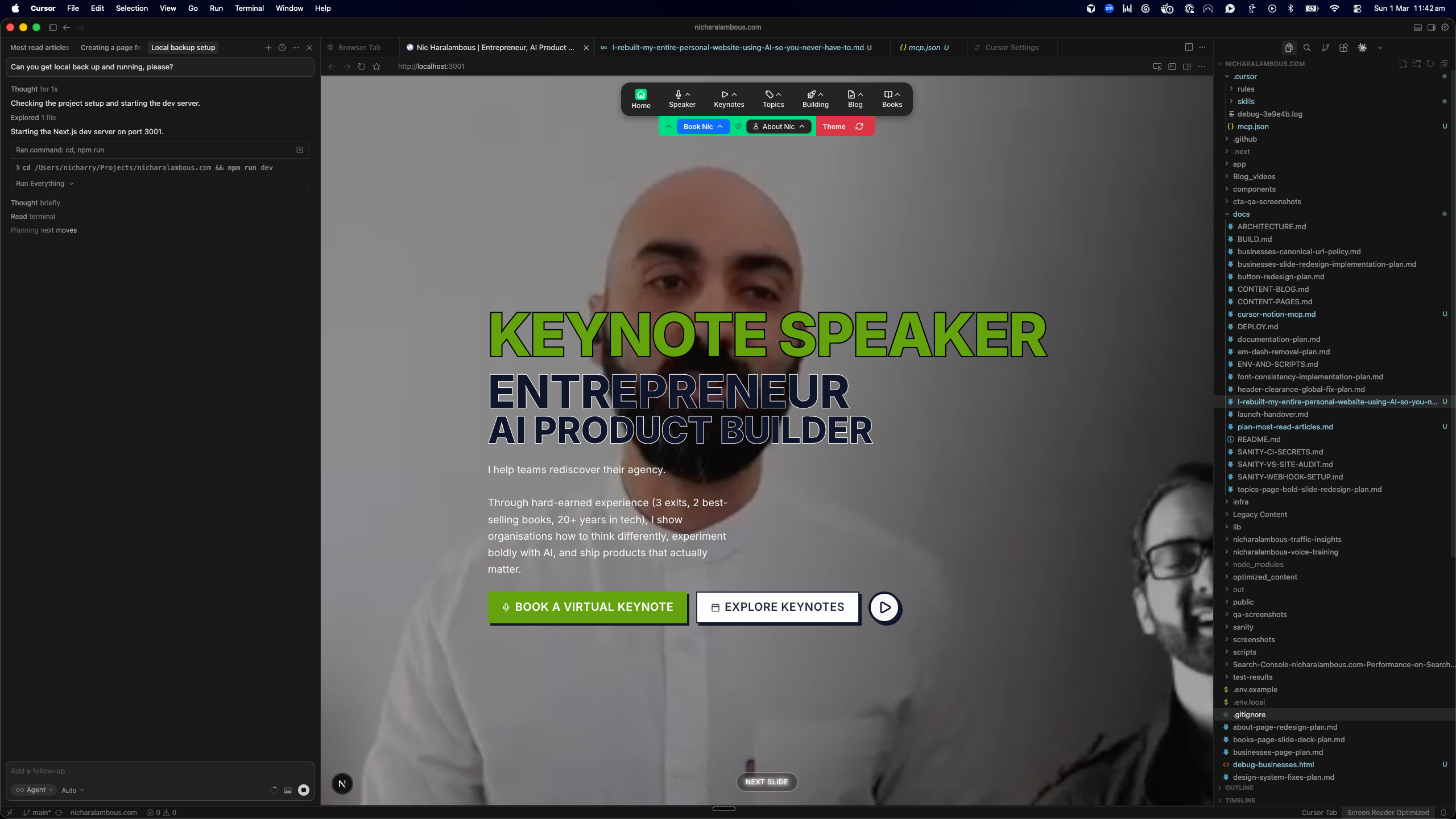
That was the unlock. I opened Zoom, started a call, shared my screen as if I was presenting, and looked at the interface. The controls. The toolbar. The participant view. I'd been staring at that interface for years without really seeing it. And suddenly it was obvious: that was the design language for the entire site.
I took a screenshot of the Zoom interface and fed it into Gemini, asking it to reproduce the navigation as closely as possible in code. Then I took that into Cursor with Opus 4.6 and rebuilt it component by component, button by button, the reactions, the participants icon, the share screen button, until it was almost a pixel match to the actual Zoom navigation bar.

vs

Once I had that, the rest of the site poured out.
If the nav was Zoom, then each section had to be a slide. I started designing the site the way I design one of my own virtual talks. Hero. What I speak about. Social proof. A CTA. Each section a slide. Each slide a moment that the visitor can flick through.
And then: where does Nic go in all of this? That's where the 16-bit version of me came in. I asked Gemini to create a consistent pixel-art character, a 16-bit Nic, that I could embed into each slide to tell a small story, add personality, and keep people scrolling. I created a custom Gemini prompt that would reliably produce 16-bit images on demand so I could drop the character into any slide I needed.
The entire visual identity came from a single question: what does my audience already recognise? The answer was Zoom. Everything else followed from there.
Go have a look at what that looks like in practice: nicharalambous.com.
The thing no one tells you about AI tools
The world right now is absolutely drowning in AI hype. Every platform, every newsletter, every LinkedIn post is telling you how extraordinary these tools are. And they are. I'm not here to argue with that. But there's something important that all of that hype leaves out.
AI is only as good as the person directing it.
You've probably tried some of these tools. You've probably hit a wall. Maybe you got something halfway useful and then it fell apart. Maybe the output looked right but felt wrong. Maybe you just didn't know what to do next. And if you're honest, you've probably wondered whether it's you.
It's not you. It's the experience gap.
The tools I used (Cursor, Claude, Gemini, ChatGPT) are genuinely remarkable. But here's what they can't do: they can't know what you don't know and they sure as shit don't have your taste. If you ask an AI to build you a plan for a complex website, it will build you an extraordinarily detailed plan. It will cover almost everything. Almost. And the things it leaves out, the private keys, the robots.txt settings, the cache headers, the DNS configurations, the 47 other things that live in the margins of a production build, those are exactly the things that a person with experience knows to check, and a person without experience doesn't know exist.
That's not a flaw in the AI. That's the deal. The tool is powerful but the operator needs to match it to get the most out.
The moment I thought I'd broken everything
Let me give you a concrete example.
Deep into this build, I'm talking days and days of work (which is fucking hilarious to say out loud when I still remember a world where it took months and months to complete a build of this size), hundreds of decisions, thousands of lines of code and I was ready to go live. The plan was 99.9% complete. The AI told me so. I flicked everything on. The website loaded on my domain. It looked good. I was genuinely proud of what I was looking at.
And then I clicked a link.
Every single link on the website opened a plain text file with a .txt extension. Not a page. A file. The whole site, every article, every page, every carefully built keynote landing page, was serving raw text files to anyone who visited.
I had no idea what had happened. Neither did the AI, at first. It took me 15 or 20 minutes of digging with AI help to figure out that the robots.txt file wasn't correctly excluding .txt files from the build output. A small configuration detail. Completely invisible if you don't know to look for it. The kind of thing that would make a normal person think the whole project was broken beyond repair.
I knew it was solvable. I knew roughly where to look. I knew the language to use when asking for help diagnosing it. That knowledge came from two decades of building things and watching them break.
There were moments like that throughout this entire build. Micro-crises that my experience could absorb. That's not me boasting, it's just me being honest with you about what this actually took.
If you understand the lexicon of the thing you're trying to build, the words that the people in the industry use, these builds become faster, quicker, easier, and more straightforward. Instead of asking AI to add a username and password so that users can log in, you're asking for an authentication flow. When you ask AI to build a page that explains what your service does before somebody joins, you're asking for an onboarding flow. If you don't know those words, you're working twice as hard for half the result.
As my grandfather used to say: "You can buy bread and you can buy cheese, but you can't buy this experience." The only way to gain this kind of lexicon is to build stuff.
The workflow: I didn't just use AI. I built a system for using AI.
Most people who try to use AI for something complex treat it like a vending machine. Put in a request, get out a result. That works for simple things. For something like this, it's not enough.
Here's how I actually worked.
I started by using ChatGPT to plan the entire migration and build at a high level: SEO strategy, content migration for roughly 1,600 articles written over 20 years, keyword research, analytics. That plan went into a markdown document. A big one.
Then I took that plan into Cursor (an IDE that software engineers use to write code, which I had set up so that I could use it without writing a single line of code myself) and used Anthropic's Claude Opus model to tear the plan apart. To stress-test it. To find what was missing.
From there, I built a set of custom skills inside Cursor that governed my entire workflow:
- /explore: the AI and I think through what we're building together before touching any code.
- /create-plan: from the exploration, the AI creates a detailed, modular plan broken into phases, so we can stop cleanly between each one.
- /execute: the AI builds the phase.
- /review: a different AI model (I used OpenAI's Codex) reviews what Opus just built.
- /peer-review: Opus then reviews Codex's feedback, and produces a final list of fixes.
- /build-deploy: a single command that builds the site and deploys it to AWS, so I never have to do it manually.
Thanks to Zevi for the basic structure of these skills!
Every time something frustrated me or felt repetitive, I asked the AI to create a new skill to handle it. That system, that layered, spec-driven, multi-model process, is what made the output as good as it is. Not the AI alone. The system I built around it.
I talked to Opus like a CTO. It executed like some of the best engineers I've ever worked with. It rarely hallucinated. It kept context across a massive build. But I was always the one deciding what to build, what to check, what was missing from the plan, and when something had gone sideways.
The tools I used
Here's the honest answer: it wasn't one thing. It was a small ecosystem of tools, each doing a specific job.
For design and visuals
- Google Gemini: I used Gemini to create a consistent visual identity across the whole site. Every one of those pixelated characters you see, and the basic slide structure of the site, came from Gemini. It was my visual creative partner.
- Claude Opus: For the background images that shift on every slide and match the content of that section, I worked with Opus. It helped me think through what each section needed to feel like and then produce it.
- Remove.bg: Once Gemini had generated the character images, I needed to strip the backgrounds so they'd be transparent and work across different slide colours. Remove.bg handled that cleanly and quickly.
For thinking and content
- ChatGPT: I used ChatGPT for two things: general problem-solving (particularly around SEO strategy and anything I needed to think through before touching code), and for refining content to make it tighter and more direct. I also built a custom GPT called The Reducer, which is specifically designed to help me cut ideas down to their most valuable core and avoid scope creep.
For input (and this one matters more than people realise)
[Wispr Flow](https://wisprflow.ai/r?NIC64): I used Wispr Flow for dictation throughout the entire build, and I want to spend a moment on this because I think it's one of the most underrated unlocks for anyone trying to get serious results from AI tools.
There is a filter that kicks in when you go from thinking a thought to speaking it. There is an entirely different, much heavier filter that kicks in when you go from thinking to typing. When we type, we edit as we go. We compress. We strip out context and nuance trying to produce a clean sentence. And that's exactly the opposite of what AI tools need. These models want more context, more detail, more of your actual thinking. Not the polished summary you'd send in an email.
Dictating removes that second filter. You talk the way you actually think. The prompts get longer, richer, and more specific. The outputs get dramatically better as a result.
Wispr Flow works with shortcut keys so you never lift your hands off the keyboard. It handles bullet points, picks up your tone, makes corrections on the fly. Using it made working with my AI tools feel like I was talking to a teammate rather than operating a machine.
If you're typing your prompts, you're leaving quality on the table.
And if I'm being honest, I'd say I only physically typed about 30% of this article. The rest is my words dictated through Wispr Flow.
For building
Almost everything lived inside Cursor. Four models, four jobs:
- Claude Opus 4.6: The main workhorse. Did roughly 90% of the actual build. I talked to it like a CTO. It executed like one.
- Claude Sonnet 4.6: Anthropic released this mid-build. It became a fast, reliable secondary model for tasks that didn't need Opus-level depth.
- OpenAI Codex 5.3: Code review only. After Opus completed a phase, Codex would go through the work and flag concerns. That two-model review process caught things that a single model would have missed.
- Cursor's built-in Composer model: For quick, small changes where I didn't need the heavy machinery. Fast and useful for tight, scoped tasks.
For content management
- Sanity CMS: The headless CMS that sits behind the entire site. All keynote pages, blog posts, topic hubs, testimonials, and site settings live in Sanity. I publish there; the site rebuilds and goes live. No platform logins, no dependencies on anyone else.
For security
Security is the thing most people skip when they're building something new and excited. I didn't want to do that. The approach I used was the same multi-model review system I applied everywhere else, but specifically for security.
I found security skills online (frameworks created by security experts and shared publicly) and loaded them into Cursor so the AI had a proper security checklist to work from, not just its general knowledge. From there:
- Opus ran the initial security review against the site.
- Codex reviewed Opus's findings: a second pass with a different model catching anything the first missed.
- Opus then peer-reviewed Codex's feedback, consolidated the concerns, and produced a final list.
- I implemented the fixes.
It's not a replacement for a professional security audit if you're handling sensitive data or payments. But for a static marketing site, it's a serious and systematic process that most solo builders never bother with. The fact that AI makes it accessible to someone like me, without a security background, is one of the genuinely remarkable things about where these tools are right now.
That's the full stack. Simple in concept. Significant in practice.
So why shouldn't you do this?
Because Squarespace is fine for most things most people need. Wix is fine. WordPress is fine.
I mean that genuinely. If you want a personal website, a portfolio, or a small business presence, just use one of those. They exist because the complexity of building a site from scratch is real, and most people have no reason to wrestle with it. The professionals who built those platforms are exceptionally good at what they do.
The reason I chose to do this, the reason I wanted ultimate control over my own infrastructure, my own SEO, my own CMS, my own deploy pipeline, is because I believe that people with deep experience can use AI tools in a way that's simply not available to everyone yet. Not because AI is gatekept, but because the experience that lets you direct it effectively takes time to build.
You need to know what a favicon is before you can care that it's missing. You need to understand the difference between a frontend and a backend before you can ask an intelligent question about why one of them isn't working. You need to have felt the specific panic of a broken deploy before you know how to keep calm and look in the right place.
The AI doesn't tell you what you don't know to ask. That's the gap. And it's not the AI's fault.
That gap is closeable.
I am not uniquely gifted. I promise you. I am not smarter than you, I am not more technically talented, and I have failed publicly and embarrassingly more times than most people I know. What I have is experience, and experience is just the residue of spending years trying things, breaking things, learning things, and trying again.
The single most important thing I can tell you is this: your ability to be curious, to try, to ask questions and push further and toil through the frustrating parts... that is what will set you apart. Not in this project, maybe. Not right now. But over time, and sooner than you think.
Start smaller. Build something. Break it. Ask why. Fix it. Repeat that enough times and eventually you'll be in a position where you can sit in front of a tool like Cursor and say "we're building a full website from scratch" and mean it.
Do. Fail. Learn. Repeat.
Tips for getting started with AI builds
If you're going to start experimenting with AI tools seriously, here's what I'd tell you from the other side of this build.
1. You already know how to prompt. You've just been doing it with humans.
As a business founder and product leader, I've been prompting for 20 years. Telling people what I need, clarifying when they misunderstand, giving feedback when the output is wrong. That's prompting. The skill transfers directly. Stop treating AI like a search engine and start treating it like a colleague who needs a proper brief.
2. Use dictation. Typing is for chumps.
I built most of this with my voice. Dictating into AI is faster, more natural, and produces better prompts because you talk the way you actually think. Stop typing long prompts and start talking them.
3. Get the agent to write a handover document before switching models or the context window closes.
Every time I moved from one model or one phase to the next, I'd ask the current agent to write a short handover document summarising what had been done, what decisions had been made, and what the next agent needed to know. It saves tokens, cuts context loss, and forces you to review the plan regularly. Build that habit early.
4. When an agent keeps struggling with something, turn it into a skill.
If you find yourself repeating the same instructions or fixing the same kind of mistake over and over, that's a signal. Write a skill; a short document that tells the agent exactly how to do that thing, every time, the same way. My /build-deploy skill exists because the deploy process was more labourious than I wanted to maintain myself. Now it doesn't take up any of my effort or time.
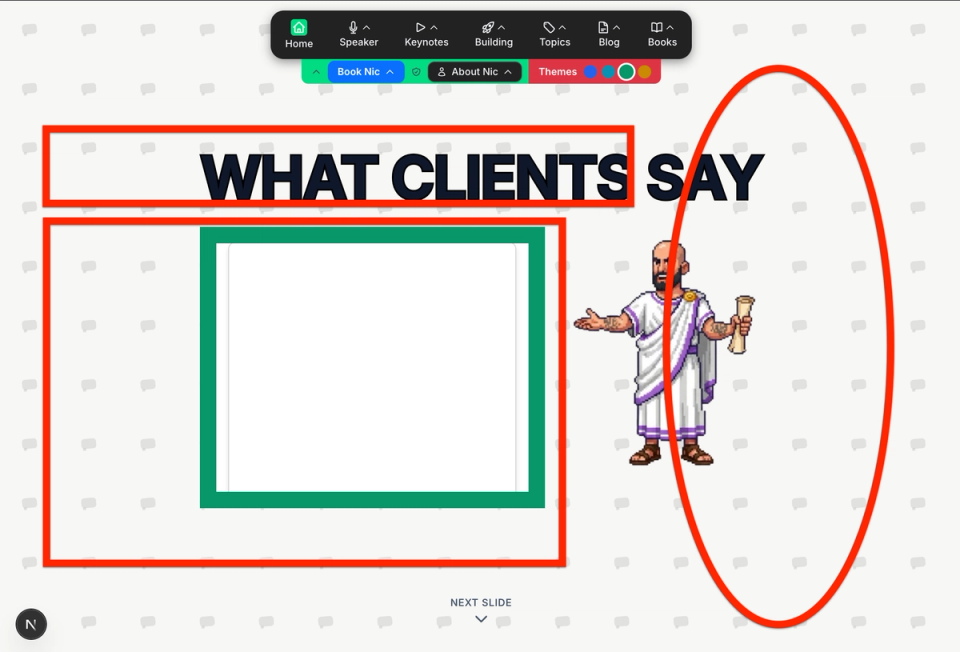
5. Use screenshots to have one model critique another model's frontend.
After Opus built a page, I'd screenshot it and ask a different model to look at it visually and critique the implementation. Models catch different things. Two sets of eyes, even AI ones, are better than one.
6. For visuals: Gemini, then Remove.bg.
If you're generating images with specific elements (characters, icons, anything you want to layer into a design) tell Gemini: "Only include this element. Make the entire rest of the image a plain white background." That specificity matters. Then run the output through Remove.bg to get a clean transparent PNG you can actually use.
One critical note: this only works if you are not in the EU. Gemini's image generation is restricted there. If you're in the EU, you'll need a VPN connected to a location where it's available.
7. Design by drawing first.
Before you ask any AI to build something, sketch it. Even badly. Even on a napkin. The act of drawing forces you to make decisions (layout, hierarchy, what goes where) that you'll otherwise leave to the AI and then spend three rounds of prompting trying to correct. A two-minute sketch saves an hour of back-and-forth.
I built nicharalambous.com with AI and it was a magical futuristic experience that set my brain alight with opportunity. I've been waiting 20+ years to feel this empowered by technology.
The site runs on Next.js 15, costs less than $10 a month to host, and I manage it entirely myself. No platform logins. No agency. No dependencies on anyone else.
I'm proud of it. Not because it's perfect. Because I built it myself, with tools I learned to use, on a foundation of experience that took me two decades to accumulate.
If you want someone who actually uses these tools, who understands what it means to build with AI, not just talk about it, then book me for a keynote or sign up for the next cohort of NoBullShip.co and take your own idea live.
You never have to do what I did. But you should absolutely understand why I could.